Mastering Zero Downtime Deployment: How a Professional Git Workflow and Staging Protects Your ROI
There is a specific kind of dread that every growing business eventually learns to recognize. It is the moment right after you click “update” on a plugin, or right after a developer tells you a new feature is now live, when you refresh your homepage and hold your breath. For businesses running a custom WordPress site that actually drives revenue, this small moment of anxiety repeats constantly, and it should not have to. A single broken checkout page, a fatal error visible to every visitor, or a missing hour of downtime during a paid campaign is not just an inconvenience. It is lost revenue, lost trust, and in some cases, lost customers who never come back.
The businesses that never seem to worry about this are not lucky. They are simply operating with a different process. They have replaced live editing with a professional deployment pipeline built on version control and staging environments, the same standard used by serious software companies everywhere, applied specifically to WordPress. This article walks through exactly what that pipeline looks like, why it matters so much for growing startups and agencies managing multiple critical web assets, and how a dedicated WordPress DevOps engineer keeps it running reliably month after month.
The Risk of Live Editing
To understand why zero downtime deployment matters, it helps to first understand what most businesses are actually doing when they think they are being careful. Many WordPress sites, even ones that generate significant revenue, are still managed by editing files directly on the production server, installing plugin updates straight to the live environment, and testing changes by simply looking at the site after the fact to see if anything obviously broke. This approach is often called live editing, and it is, without question, the single biggest operational threat to business continuity for any serious WordPress site.
What Live Editing Actually Means
Live editing happens whenever a change touches the version of your website that real visitors and customers are currently seeing, before that change has been verified anywhere else. This includes updating a plugin directly through the WordPress admin dashboard on the production site, editing a theme file through an FTP connection straight into the live directory, running a database change against the production database without a backup or a test pass, or installing a new plugin to “just see how it works” on the site your customers depend on every single day.
None of these actions feel reckless in the moment. They feel routine, because most of the time they work fine. That is precisely what makes live editing so dangerous. It creates a false sense of safety built on a long streak of updates that happened not to cause problems, right up until the update that does, usually at the worst possible time, such as during a product launch, a seasonal sales push, or a paid advertising campaign that is actively sending traffic to the page that just broke.
Why Updates Break Sites More Often Than You Think
WordPress itself is remarkably stable, but the ecosystem around it is enormous and only loosely coordinated. A typical custom business site runs a theme, usually customized, alongside a dozen or more plugins, each maintained independently by different developers with their own release schedules and their own assumptions about how other plugins behave. When one of these pieces updates, it can change a function name, alter how it hooks into WordPress, shift a database structure, or simply introduce a new bug that was not caught in the plugin author’s own testing.
None of these plugin authors know about your specific combination of theme, plugins, and custom code. They cannot test against your unique setup because it does not exist anywhere except on your server. This means every update carries some nonzero risk of conflict, and the more customized and feature rich your site is, the higher that risk becomes. A simple five page brochure site with two plugins rarely runs into trouble. A custom ecommerce build with thirty active plugins, custom checkout logic, and several third party integrations is a completely different risk profile, and treating it with the same casual update process is where serious problems start.
The Compounding Cost of Downtime
It is worth being specific about what downtime actually costs, because the number is usually larger than business owners expect. If your site generates meaningful revenue through ecommerce sales, lead generation forms, or booking requests, every hour it is down or malfunctioning is an hour of that revenue simply gone, not deferred, not recovered later, gone. Visitors who land on a broken page during that window do not typically wait around or return later on their own. They leave, and in many cases they buy from a competitor instead.
Beyond the immediate lost revenue, there is a reputational cost that is harder to measure but very real. Customers who experience a broken checkout or an error page once are less likely to trust that site with their payment information a second time. For an agency managing a client’s site, an unplanned outage caused by an untested update is exactly the kind of incident that damages a relationship built on trust, regardless of how quickly the fix eventually goes out. And for internal marketing teams, a broken landing page during an active paid campaign means advertising spend is actively being wasted every minute the fix takes to deploy, on top of the conversions already lost.
The Illusion of Control
One of the more subtle problems with live editing is that it creates an illusion of control that does not hold up under pressure. When something breaks in production, the instinct is to fix it as fast as possible, directly on the live site, because that is where the problem is visible and that is where the fix needs to end up eventually. But fixing a broken production site under pressure, without the ability to test the fix first, means you are debugging live, in front of your customers, often making rushed decisions that introduce a second problem while trying to solve the first. This is how a five minute plugin conflict turns into a ninety minute outage, not because the underlying bug was especially difficult, but because every attempted fix had to be tested directly against the live environment, one risky change at a time.
Why This Gets Worse as Businesses Grow
Startups and agencies managing multiple critical web assets face a version of this problem that scales in a particularly unforgiving way. A single business with one website can, in theory, tolerate occasional live editing risk because there is only one asset to worry about. An agency managing fifteen client sites, or a growing company running a main site alongside several campaign specific microsites, cannot afford the same casual approach multiplied across every property they touch. One risky update process, repeated across dozens of sites and hundreds of monthly changes, does not just multiply the risk of downtime. It makes a serious incident close to inevitable over time, purely as a matter of statistics.
The Hotfix Panic Cycle
There is a recognizable pattern that plays out again and again in businesses relying on live editing, and it is worth describing in detail because it explains why the problem tends to get worse rather than better over time without a deliberate change in process. Something breaks, usually noticed either by an internal team member stumbling across it or, worse, by a customer reporting it. Someone logs directly into the live site to investigate. Under pressure, with revenue actively being lost every minute the issue persists, that person makes a change directly on production, hoping it resolves the problem. Sometimes it does. Sometimes it does not, and now there are two problems layered on top of each other, both live, both affecting real customers, with no clean record of what the site looked like before any of this began.
This cycle is exhausting for teams, and it quietly erodes confidence in the website as a reliable business asset. Marketing directors start hesitating before scheduling anything that depends on the site behaving perfectly. Business owners start associating “update” with “risk” rather than “improvement.” Over time, teams caught in this cycle often become reluctant to update anything at all, which creates an entirely different problem: a site running increasingly outdated, unpatched software, which is itself a serious security risk. Live editing does not just cause occasional incidents. It creates a culture of fear around necessary maintenance, which is arguably the more damaging long term consequence.
Why Backups Alone Are Not a Real Safety Net
Many businesses believe they are protected because they have backups running. Backups are important, but they are a very different tool than version control and staging, and relying on backups alone leaves significant gaps. A backup typically restores an entire site to a previous point in time, files and database together, which means recovering from a bad update usually means losing every other change made since that backup was taken, not just the problematic one. If a backup runs nightly and an issue is not caught until the following afternoon, restoring from backup means losing an entire day of legitimate content updates, orders, or form submissions alongside the fix.
Version control solves this more precisely. Rolling back a specific code change through Git does not touch legitimate content, orders, or data created since that change was deployed. It reverses exactly the problematic change and nothing else. Backups remain an essential part of a complete safety strategy, particularly for protecting against data loss, hosting failures, or security incidents, but they are not a substitute for the precision and speed that proper version control and staging provide specifically around code deployment risk.
The Git Safety Net
The first pillar of a professional deployment pipeline is version control, almost always implemented through Git, the same system used to build essentially all serious software today. Git solves a problem that live editing has no answer for: it gives every change a permanent, trackable, reversible record, independent of whatever happens to be sitting on the production server at any given moment.
What Version Control Actually Does
At its core, Git takes a snapshot of your code every time a meaningful change is saved, called a commit. Each snapshot is labeled, timestamped, and attributed to whoever made the change. Instead of a single mutable copy of your site’s code sitting on a server, constantly being overwritten by whoever last touched it, you get a complete history of every version your code has ever been in, all the way back to the beginning of the project. This history lives independently of the live server, typically in a repository hosted on a platform built specifically for this purpose.
This might sound like a small technical detail, but its practical effect is enormous. If a change introduces a bug, you are never stuck trying to manually reconstruct what the code looked like before the change, hoping your memory or a scattered set of backup files is accurate. You simply roll back to the exact previous commit, restoring the site to precisely the state it was in before the problem was introduced, in minutes rather than hours.
Every Change Becomes Trackable
Beyond the safety net of being able to reverse a change, version control creates full accountability and visibility into what has actually happened to a site over time. Every commit records what was changed, when it was changed, and who changed it, along with a description of why. For an agency managing multiple developers across multiple client sites, this is the difference between knowing exactly which change caused an issue within seconds, and spending hours interrogating a team about who touched what and when.
This history also becomes an asset in its own right as a site matures. Six months after a feature ships, if a related bug surfaces, the commit history shows exactly what was built, how it was built, and what assumptions were made at the time, without relying on anyone’s memory of a project from half a year earlier. This kind of institutional memory is nearly impossible to maintain under a live editing workflow, where the only record of a change is the change itself, silently overwriting whatever came before it with no trace left behind.
Branching: Working on Changes Without Touching the Live Site
A core concept in any professional Git workflow is branching. Rather than making changes directly against the single, live version of the code, a branch creates an independent working copy where new development happens in isolation. A developer building a new feature, fixing a bug, or testing a plugin update works entirely within their own branch, completely separate from the code currently running your live site. Nothing in that branch affects the production environment until it is deliberately and explicitly merged in, after review and testing.
This single practice eliminates an enormous category of risk. There is no scenario under a proper branching workflow where an incomplete, half tested change accidentally ends up live, because the live site simply is not connected to work in progress. The production environment only ever reflects code that has been through a deliberate, reviewed merge process, not whatever happens to be the most recent edit someone made.
Code Review as a Second Set of Eyes
A properly structured Git workflow also opens the door to code review, where a second engineer examines a proposed change before it is merged and deployed. This might sound like bureaucratic overhead, but in practice it catches a significant share of bugs before they ever have the chance to reach a live site. A second reviewer often notices an edge case the original developer missed, a security concern that was not considered, or a conflict with another part of the codebase that is not obvious from within the branch alone.
For growing businesses working with an agency or a distributed development team, this review step also creates consistency across multiple contributors. Different developers naturally have different habits and blind spots. A review process built into the deployment pipeline ensures that every change, regardless of who wrote it, meets the same standard before it is allowed anywhere near the production environment.
Repository Management as an Operational Discipline
Setting up Git for a single small project is straightforward. Managing repositories properly across multiple sites, multiple environments, and multiple contributors over years of ongoing development is a genuine operational discipline, and it is where WP repository management as a specific practice becomes important. This includes maintaining a clean, organized branching structure so that work in progress is easy to find and review, properly excluding sensitive credentials and environment specific configuration from the repository itself, managing plugin and theme code in a way that survives WordPress core updates without conflict, and keeping repository history clean enough that rolling back or investigating a past change remains fast and reliable even after years of continuous development.
Done poorly, a Git setup can become just as chaotic as live editing, with tangled branches, unclear history, and confusion about which version of the code is actually running in production. Done properly, it becomes the foundation that everything else in a professional deployment pipeline depends on.
Tagging Releases for Fast, Confident Rollbacks
Beyond individual commits, mature Git workflows use tags to mark specific points in history as official releases, essentially a labeled bookmark representing exactly what was live at a given moment. This might seem like a small addition on top of regular commits, but it matters enormously in a real incident. Instead of scrolling through dozens of individual commits trying to identify which exact combination represented the last known good state of the site, a tagged release gives the team an immediate, unambiguous answer: this specific tag was live and working correctly as of this date, roll back to exactly this point.
For businesses managing frequent updates, having a clear tagging discipline turns an emergency rollback from a stressful investigation into a calm, mechanical procedure. This distinction, between scrambling to reconstruct history under pressure and simply executing a known, rehearsed procedure, is often the difference between a five minute recovery and a two hour outage.
Keeping Environments in Sync
A Git workflow is only as trustworthy as the consistency between what is tracked in the repository and what is actually deployed across environments. If a developer ever makes a manual change directly on a server, bypassing the repository entirely, even once, the repository and the live environment quietly drift out of sync. The next deployment risks silently overwriting that manual change, or worse, the team loses confidence in whether the repository actually reflects reality at all, which undermines the entire point of using version control in the first place.
Maintaining environment parity, meaning strict discipline that every single change, no matter how small, goes through the repository and the proper deployment process rather than being made directly on a server, is one of the less visible but most important habits a professional deployment pipeline depends on. It is also one of the first disciplines that tends to slip under time pressure, which is exactly why it needs to be actively maintained rather than assumed.
The Staging Sandbox
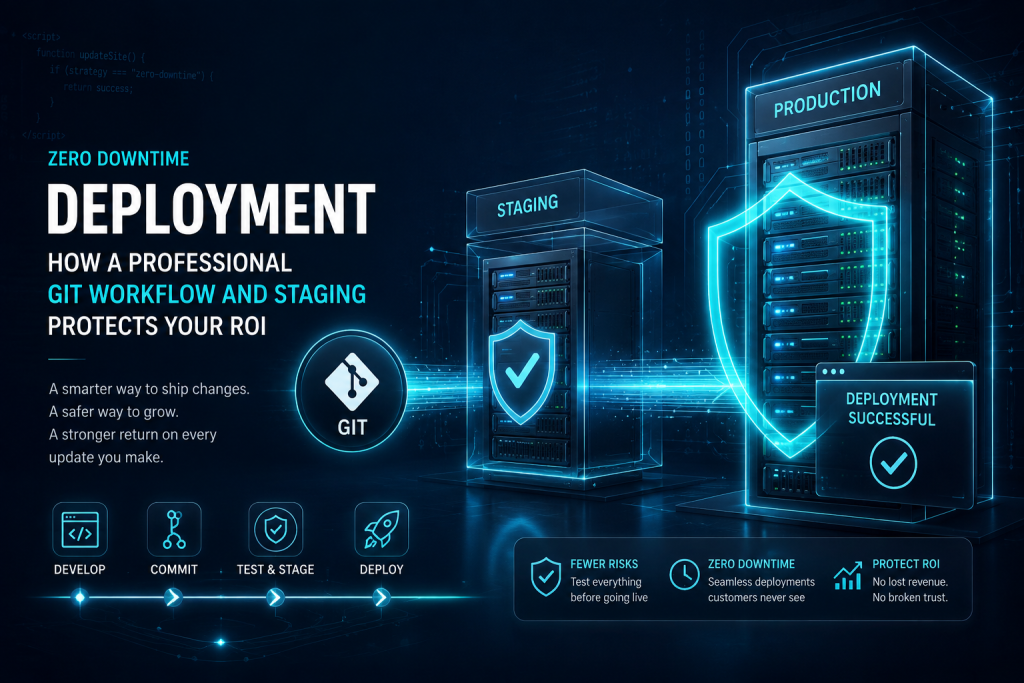
Version control solves the problem of tracking and reversing changes, but it does not by itself answer a more immediate question: how do you know a change is safe before it ever reaches your live site. This is the role of a staging environment, sometimes called a sandbox, and it is the second essential pillar of a zero downtime deployment strategy.
What a Staging Environment Actually Is
A staging site is a complete, private copy of your live website, running the same WordPress core version, the same theme, the same plugins, and ideally a recent copy of the same content and database, but living on a separate, non public environment that your customers never see. Anything can be tested here, a core WordPress update, a new plugin, a major theme change, a piece of custom logic, without any risk whatsoever to the site your customers are currently using, because the staging environment is entirely disconnected from production traffic.
The goal of a properly configured staging setup is fidelity. The closer the staging environment matches production in every meaningful way, server configuration, PHP version, plugin versions, real world content, the more confidently you can trust that whatever works correctly on staging will also work correctly once it goes live. A staging environment that differs significantly from production, running an outdated PHP version or a stripped down set of plugins, gives you a false sense of confidence that does not actually protect you from real world issues.
The Testing Process Before Anything Goes Live
A disciplined staging workflow follows a consistent process for every meaningful update. First, the proposed change, whether a plugin update, a core update, or new custom development, is deployed to staging rather than production. Second, the change is tested directly, checking not just whether the specific feature being updated works, but whether anything else on the site was affected. This includes checking critical business functions specifically: does checkout still complete correctly, do lead forms still submit and deliver notifications, does the site still load at an acceptable speed, do any custom integrations still function as expected.
Third, once the change has been verified working correctly on staging, it is deployed to production through the same controlled process, rather than being manually recreated by hand on the live server, which reintroduces the exact kind of risk staging is meant to eliminate. The deployment to production should be a mechanical, repeatable step, moving exactly the tested change from staging to live, not a second manual implementation that could differ from what was actually verified.
Setting Up a Staging Website for WordPress
For businesses looking to understand what a proper staging setup actually involves, the process generally includes a few essential components working together. A staging environment needs its own separate hosting space, ideally on the same server infrastructure as production to keep environments as similar as possible, along with a mechanism to keep it reasonably synchronized with production content so that testing reflects real world data rather than stale placeholder content from months earlier. It also needs to be properly restricted from public access and from search engine indexing, since a staging site accidentally left open to the public or indexed by search engines can create duplicate content issues or expose unfinished work.
Many hosting providers built specifically for WordPress offer staging tools as part of their platform, which can simplify the technical setup considerably. However, having a staging environment available is only half the equation. The other half is discipline: consistently using it for every meaningful change, rather than treating it as an occasional nicety reserved only for the largest updates while smaller changes continue to be pushed directly to production out of habit or time pressure.
Secure Core Update Testing
WordPress core updates deserve particular attention within a staging workflow, because core updates affect the fundamental platform every plugin and theme on your site is built on top of. A core update that introduces even a small change in how a certain function behaves can ripple outward into compatibility issues across an entire plugin stack, in ways that are genuinely difficult to predict without testing. This is exactly why secure core update testing on staging first, rather than allowing WordPress to auto update directly on a live production site, is considered a baseline professional standard rather than an optional precaution.
The testing process for a core update should verify not just that the site loads without a visible error, but that key administrative functions still work correctly, that no plugin has silently broken in a way that is not immediately obvious on the front end, and that performance has not regressed. Only once all of this has been confirmed on staging should the same core update be applied to the live environment, ideally during a low traffic window to further minimize any residual risk.
Why Staging Protects Marketing Investment Specifically
For growing startups and agencies running active paid campaigns, staging carries a particular kind of value that is easy to underestimate. A landing page connected to an active advertising campaign represents real, ongoing spend, every hour it is live and functioning correctly. If a routine plugin update breaks that landing page and the change was pushed directly to production without testing, every dollar of ad spend sent to that broken page during the outage is effectively wasted, in addition to the lost conversions that would have otherwise occurred. Staging eliminates this specific risk by ensuring that updates near an active campaign are verified working correctly before they ever have a chance to interfere with the page your traffic is currently landing on.
Handling Database Changes Safely
Code is only part of what changes on a growing WordPress site. Database structure changes too, often triggered by plugin updates that add new tables, modify existing ones, or migrate stored data into a new format. These database migrations carry a distinct kind of risk compared to code changes, because a failed or interrupted migration can leave a site in a broken, inconsistent state that is considerably harder to reverse than rolling back a code commit.
A disciplined staging process treats database migrations with particular caution, running them first against a copy of production data on staging, verifying the migration completes cleanly and that the site continues to function correctly afterward, before ever allowing that same migration to run against the live database. Combined with a fresh backup taken immediately before any production database change, this practice dramatically reduces the risk that a plugin update quietly corrupts data in a way that is not immediately obvious but causes problems weeks later.
Restricting Access to Protect the Sandbox
A staging environment is only useful if it is properly restricted from public access. A staging site accidentally left open to the public internet, or worse, indexed by search engines, creates real problems of its own, from confusing duplicate content signals that can hurt search rankings to the risk of exposing unfinished features or sensitive test data before they are ready. Proper staging setups use password protection, IP restrictions, or noindex directives specifically to keep the sandbox private while still allowing the team full access to test freely.
This might seem like a minor configuration detail, but it reflects the broader principle behind the entire staging philosophy: the sandbox needs to be a completely safe space to experiment and occasionally break things, which is only true if it is fully isolated from both public visibility and production traffic.
Role of a WP DevOps Engineer
Understanding the theory behind version control and staging environments is one thing. Actually running this process consistently, across every update, every month, for as long as a business operates its website, requires a dedicated discipline that most internal marketing or operations teams are not equipped, or meant, to provide themselves. This is the role of a WordPress DevOps engineer, and it is worth explaining specifically what this role does and why high end operations require it.
What DevOps Actually Means in a WordPress Context
DevOps, short for development operations, refers to the practice of managing the entire pipeline between writing code and running it reliably in production. In a WordPress specific context, this means owning the entire process described throughout this article: maintaining the Git repository structure, managing the staging environment and keeping it properly synchronized with production, running the testing process for every meaningful update, executing deployments in a controlled and repeatable way, and monitoring the live site closely enough to catch and respond to any issue quickly if something does go wrong despite every precaution.
This is a genuinely specialized skill set that combines software engineering discipline with deep, specific knowledge of how WordPress behaves, how its plugin ecosystem tends to break, and how hosting environments are configured. It is meaningfully different from the skill set involved in building a new feature or fixing a specific bug, which is why the strongest technical teams tend to separate these responsibilities rather than expecting every developer to independently maintain deployment discipline on top of their regular development work.
Why This Cannot Be an Afterthought
A common pattern in growing businesses is treating deployment process as something to figure out later, once the site is bigger, once there is more budget, once something has already gone wrong. This is precisely backward. The businesses that get burned hardest by a bad deployment are almost always the ones that were growing quickly, adding functionality and traffic faster than their process was maturing to handle it safely. By the time a serious incident happens, the cost of that incident, lost revenue, lost trust, emergency recovery work, is almost always higher than the cost of having built a proper pipeline from the start would have been.
A dedicated WordPress DevOps engineer treats this pipeline as an ongoing responsibility rather than a one time setup task. Staging environments need to be kept synchronized as production evolves. Repository structure needs to be maintained as more developers contribute over time. Deployment processes need to be refined as the site’s complexity grows. None of this is a project with a defined end date. It is an ongoing operational function, similar to how a growing company does not set up its accounting system once and never touch it again, but maintains it continuously as the business scales.
Coordinating Across Multiple Assets
For agencies and startups managing multiple critical web assets simultaneously, the DevOps role becomes even more central. Coordinating staging and deployment discipline consistently across ten, twenty, or fifty client sites requires standardized processes that do not depend on any individual developer’s personal habits or memory. A dedicated DevOps engineer builds and maintains these standardized processes, ensuring that every site under management receives the same level of protection regardless of which specific developer is handling a given update on a given day.
This consistency is particularly valuable during periods of team growth or transition. When a new developer joins a team managing multiple WordPress properties, a properly documented and enforced deployment pipeline means that new developer inherits safe habits automatically, rather than needing to be individually trained on tribal knowledge that lives only in the heads of longer tenured team members and disappears when those people eventually move on.
The Engineer as an Early Warning System
Beyond managing the deployment pipeline itself, a dedicated DevOps engineer typically also owns monitoring, watching for signs of trouble before they become visible to customers. This includes tracking site performance over time to catch a slow regression before it becomes a serious problem, watching error logs for warning signs that something is behaving unexpectedly even if it has not caused a visible failure yet, and keeping an eye on uptime so that any unexpected downtime, however brief, triggers immediate investigation rather than going unnoticed until a customer complains.
This proactive monitoring role closes the loop on the entire deployment philosophy described in this article. Version control and staging dramatically reduce the chance that a deployment itself introduces a problem. Ongoing monitoring by a dedicated engineer catches the smaller number of issues that slip through anyway, whether due to a hosting environment change outside anyone’s direct control, an unusual traffic pattern, or a third party service experiencing its own outage. The combination of a disciplined deployment pipeline and active monitoring is what actually produces reliable zero downtime operation over the long run, not any single practice in isolation.
The Engineer as an Early Warning System
Beyond managing the deployment pipeline itself, a dedicated DevOps engineer typically also owns monitoring, watching for signs of trouble before they become visible to customers. This includes tracking site performance over time to catch a slow regression before it becomes a serious problem, watching error logs for warning signs that something is behaving unexpectedly even if it has not caused a visible failure yet, and keeping an eye on uptime so that any unexpected downtime, however brief, triggers immediate investigation rather than going unnoticed until a customer complains.
This proactive monitoring role closes the loop on the entire deployment philosophy described in this article. Version control and staging dramatically reduce the chance that a deployment itself introduces a problem. Ongoing monitoring by a dedicated engineer catches the smaller number of issues that slip through anyway, whether due to a hosting environment change outside anyone’s direct control, an unusual traffic pattern, or a third party service experiencing its own outage. The combination of a disciplined deployment pipeline and active monitoring is what actually produces reliable zero downtime operation over the long run, not any single practice in isolation.
Live Editing Versus a Professional Pipeline
| What You Care About | Live Editing on Production | Professional Git and Staging Pipeline |
|---|---|---|
| Where changes are tested first | Directly on the site customers use | An isolated staging environment |
| Ability to reverse a bad change | Manual, slow, often incomplete | Fast rollback to a known commit or tag |
| Visibility into what changed and when | Minimal, relies on memory | Complete, permanent commit history |
| Risk during a plugin or core update | High, discovered after the fact | Low, discovered and fixed before it goes live |
| Impact of an active advertising campaign during an issue | Ad spend wasted on a broken page | Campaign unaffected, page remains stable |
| Consistency across multiple sites or developers | Depends on individual habits | Standardized, repeatable process |
A Checklist for Evaluating Your Current Deployment Process
Business owners and marketing directors who are unsure whether their current setup is exposing them to unnecessary risk can ask a few direct questions to find out. Does every plugin and core update get tested somewhere other than the live site before it is applied to production. Is there a complete, searchable history of every code change ever made to the site, including who made it and when. If a recent update caused a problem right now, could the team roll it back within minutes, or would that require manually reconstructing what the site looked like beforehand. Is there a staging environment that closely mirrors production, properly restricted from public access, kept reasonably synchronized with real content. Is there a specific person or team responsible for owning this process consistently, or does it depend on whichever developer happens to be handling a given task.
If the honest answer to more than one of these questions reveals a gap, that gap represents real, quantifiable risk sitting inside the business today, whether or not it has caused a visible incident yet. The absence of a past incident is not evidence of a safe process. It is often simply evidence that a risky process has not yet been tested by an update serious enough to expose it.
Putting a Number on What Downtime Actually Costs
It is worth walking through a simple way to estimate the real financial exposure a business carries when it operates without a proper deployment pipeline, because abstract risk is much harder to act on than a concrete figure. Start with average hourly revenue generated through the website, whether through direct sales, average order value multiplied by typical hourly order volume, or estimated lead value multiplied by typical hourly lead volume. Multiply that figure by the average length of past incidents, or a reasonable estimate if no serious incident has occurred yet, typically somewhere between thirty minutes for a quickly caught issue and several hours for one that required extensive troubleshooting directly on a live site.
For a business generating even a modest amount of hourly revenue through its website, this calculation frequently produces a number in the thousands of dollars for a single moderate incident, once lost conversions, wasted advertising spend during an active campaign, and the staff time spent firefighting are all accounted for. Compare that figure against the ongoing cost of maintaining a proper Git and staging pipeline with dedicated engineering oversight, and the return on investment case becomes straightforward. The pipeline does not need to prevent many incidents to pay for itself many times over. It typically only needs to prevent one.
Why This Investment Compounds Over Time
Unlike many operational investments that provide a fixed, one time benefit, a properly maintained deployment pipeline becomes more valuable the longer a business operates and the more complex its website becomes. Every new plugin added, every new integration connected, every piece of custom functionality built increases the number of moving parts that could potentially conflict during an update. A business with a simple site today but ambitious growth plans is, in effect, building toward a future where the consequences of live editing become progressively more severe, even if the current risk feels manageable.
Setting up a professional pipeline early means that growth in site complexity is matched step for step by growth in operational safety, rather than the two drifting further and further apart until a serious incident forces an overdue correction. This is precisely why the strongest technical teams treat deployment discipline as a foundational investment made early, rather than a mature company luxury added only once a business has already scaled past the point where informal processes were ever going to hold up.
What This Looks Like in Practice
Consider a growing ecommerce business running a custom WordPress and WooCommerce build, actively running paid advertising campaigns and processing orders around the clock. Under a professional deployment pipeline, a typical month might involve several plugin updates, a WordPress core update, and a new feature request from the marketing team to add a limited time promotional banner across the site.
Each of these changes follows the same disciplined path. The plugin updates are first applied to the staging environment, where the checkout flow, the product pages, and the key integrations are all verified working correctly before anything touches the live site. The core update goes through the same process, with particular attention paid to confirming that no plugin conflict has been introduced. The new promotional banner is built on its own Git branch, reviewed by a second engineer before merging, tested thoroughly on staging including on mobile devices, and only then deployed to production through a controlled process.
At no point during this month does the live site experience an untested change. Customers placing orders throughout the month never encounter a broken checkout caused by an update gone wrong, because every update was verified safe before it ever had the chance to affect them. If, despite all of this care, something unexpected does occur, the complete Git history means the team can identify exactly what changed and roll it back within minutes, rather than spending hours trying to manually reconstruct what the site looked like before the problem appeared.
A Second Example: An Agency Managing Multiple Client Sites
Now consider a digital agency responsible for fifteen client websites, each with its own combination of plugins, custom functionality, and business priorities. Without a standardized deployment process, this agency is effectively managing fifteen separate pockets of risk, each dependent on whichever developer happens to be handling updates for that particular client on a given day, with inconsistent testing practices across the roster.
With a dedicated WordPress DevOps engineer maintaining a standardized Git and staging pipeline across all fifteen properties, the agency gains a consistent, repeatable process that does not depend on any individual developer’s personal discipline. Every client site receives the same standard of testing before any update goes live, every change across every site is tracked in the same reliable version history, and if an issue does occur on any one of the fifteen sites, the resolution process is identical and well understood rather than improvised under pressure. This consistency becomes a genuine competitive advantage for the agency, allowing it to confidently take on more clients without proportionally increasing the risk of a damaging incident on any single account.
Common Questions About Zero Downtime Deployment
Does staging slow down how quickly changes can go live
A properly built staging workflow adds a testing step, but it does not need to add significant delay for most routine changes. Once the pipeline is set up correctly, moving a tested change from staging to production is typically a fast, mechanical step. The larger time investment is in the testing itself, and that time is almost always smaller than the time it would take to recover from an untested change breaking the live site, along with the reputational and revenue cost of the outage itself.
Is a staging environment only necessary for major updates
No. Even small plugin updates can introduce conflicts, and the businesses most likely to be caught off guard are usually the ones that reserved staging testing only for major changes while pushing smaller updates directly to production out of habit. A consistent standard, testing every meaningful change regardless of how minor it seems, is what actually produces reliable zero downtime operation over time.
What happens if an issue is only discovered after a deployment
This is exactly the scenario a proper Git workflow is built to handle gracefully. Because every deployment corresponds to a specific, identifiable commit, rolling back to the previous known good state is a fast, controlled operation rather than an emergency scramble to remember what the site looked like before the change.
Can a small business benefit from this process, or is it only for larger operations
Any business where the website plays a meaningful role in revenue, whether through ecommerce, lead generation, or booking, benefits from this discipline regardless of overall size. The scale of the operation affects how elaborate the pipeline needs to be, not whether the underlying principles of version control and staging are worth applying in the first place.
How does this relate to ongoing WordPress maintenance more broadly
A professional deployment pipeline is the operational backbone that makes every other kind of ongoing WordPress maintenance safer and more reliable, from routine plugin updates to security hardening to new feature development. Without it, every category of maintenance work carries elevated risk of causing the exact kind of disruption it is meant to prevent.
Does this process work with popular WordPress hosting providers
Yes. Most managed WordPress hosting providers built for business use offer infrastructure that supports staging environments and Git based deployment workflows, either natively or through integration with external tools. The specific technical setup varies by host, but the underlying principles, testing before deploying and tracking every change through version control, apply regardless of which hosting platform a site runs on. What matters most is not the specific tools chosen but the discipline of actually using them consistently for every meaningful change.
What if the business already experienced downtime from an untested update in the past
A past incident, while painful, is often the clearest possible signal that a proper deployment pipeline is overdue rather than optional. The good news is that setting up version control and a staging environment does not require rebuilding a website from scratch. An existing site can be brought into a proper Git repository and paired with a staging environment as a structured setup project, after which every future update follows the safer process going forward. The cost of setting this up is almost always smaller than the cost of a single serious outage, which makes it one of the more straightforward return on investment decisions a growing business can make.
How long does it typically take to set up a proper Git and staging workflow
The technical setup itself, connecting a site to a Git repository, provisioning a staging environment, and establishing a deployment process, can often be completed within a relatively short engagement once the current state of the site has been assessed. The more important, ongoing part is the ownership afterward, making sure every future update actually follows the new process rather than the team drifting back into old habits under time pressure. This is precisely why the role of a dedicated engineer matters as much as the initial technical setup.
Why Businesses Underestimate This Risk Until It Is Too Late
There is a specific reason so many growing businesses operate without a proper deployment pipeline despite the clear risk involved, and it has less to do with awareness than with how the cost of that risk is distributed over time. Live editing works fine the vast majority of the time. A business might go six months, a year, sometimes longer, without a serious incident, and each uneventful update quietly reinforces the belief that the current process, however informal, is good enough. This is survivorship bias playing out in real time. The absence of a disaster so far is treated as evidence of safety, when it is often simply evidence that the dice have not yet landed on the wrong number.
The businesses that eventually invest in a proper Git and staging pipeline tend to fall into two categories. The first category invests proactively, usually because a founder or operations lead has seen this exact failure play out at a previous company and refuses to repeat it. The second category invests reactively, after a costly outage has already occurred, treating the investment as damage control rather than prevention. Both categories end up in the same place technically, but the businesses in the first category never pay the price the second category already paid to get there. There is no reason a growing business needs to wait for its own painful incident before adopting a standard that the most serious software companies in the world have treated as non negotiable for decades.
Confidence as an Underrated Business Outcome
There is a benefit to a professional deployment pipeline that rarely appears on any spreadsheet but matters enormously to how a growing business actually operates day to day, and that benefit is confidence. When a marketing director knows that a plugin update or a new feature has been properly tested on staging before ever reaching production, they can schedule a campaign launch without quietly worrying whether an unrelated technical change might interfere with it. When a founder knows that every code change is tracked and reversible, they can approve necessary updates and improvements without the background anxiety that has, in many businesses, led to a culture of avoiding changes altogether out of fear.
This confidence changes behavior in productive ways across an entire organization. Teams that trust their deployment process update more frequently, ship improvements faster, and generally treat their website as a living, evolving business asset rather than a fragile system that must be handled with white knuckled caution. Ironically, the businesses most afraid of touching their website are often the ones with the least reliable process protecting them, while the businesses with a properly engineered pipeline feel free to move quickly precisely because they have already engineered away the risk that used to make speed dangerous.
Protecting Your ROI Is an Operational Decision, Not a Technical Detail
It is easy to think of Git workflows and staging environments as purely technical concerns, the kind of detail that belongs to developers and does not need much attention from a business owner or marketing director. This framing misses the actual point. Every hour of downtime, every broken checkout during a campaign, every emergency fix pushed directly to a live site under pressure, is a direct hit to the return on investment your website is supposed to generate. A professional deployment pipeline is not an engineering luxury. It is a business continuity decision, with a measurable financial impact every time it prevents an outage that would otherwise have happened.
Growing startups and agencies managing multiple critical web assets face this risk more acutely than most, simply because they have more surface area where something can go wrong, and more to lose when it does. Investing in version control discipline, a real staging environment, and a dedicated engineer who owns this pipeline as an ongoing responsibility rather than an occasional afterthought is one of the highest leverage operational decisions a growing business can make, precisely because its value shows up as incidents that never happen, revenue that is never lost, and campaigns that never get interrupted by a fixable mistake.