

How to Build a High-Performance Custom WP Backend for SaaS
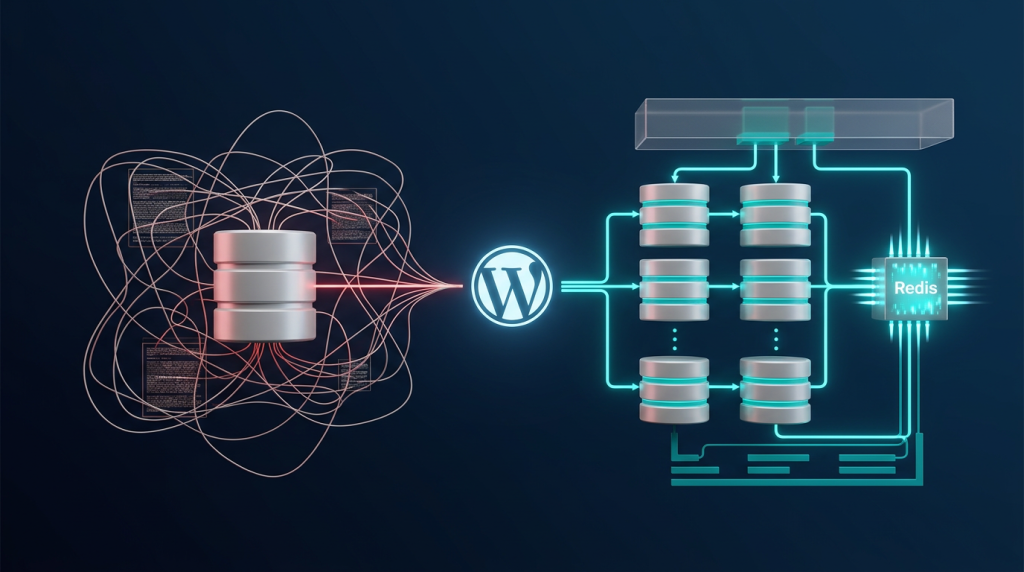
WordPress is often dismissed for SaaS development because people mistake the CMS for the Framework. However, when you strip away the bloat and treat WordPress as a managed database and API engine, you get a backend that can compete with Laravel or Node.js. The key is knowing how to build a high-performance custom WP backend for SaaS—and re-engineer its core accordingly.
A high-performance custom WP backend for SaaS demands three non-negotiable architectural decisions: migrating away from postmeta to Custom Database Tables, implementing a Headless API architecture that decouples your frontend entirely, and layering Redis-backed Object Caching across every high-frequency query path. For context on how this fits into broader WordPress infrastructure strategy, see our guide on enterprise WordPress maintenance.
The Database Rebellion: Why postmeta Will Destroy Your SaaS Custom WP Backend
The EAV Model Problem in a Custom WP Backend for SaaS
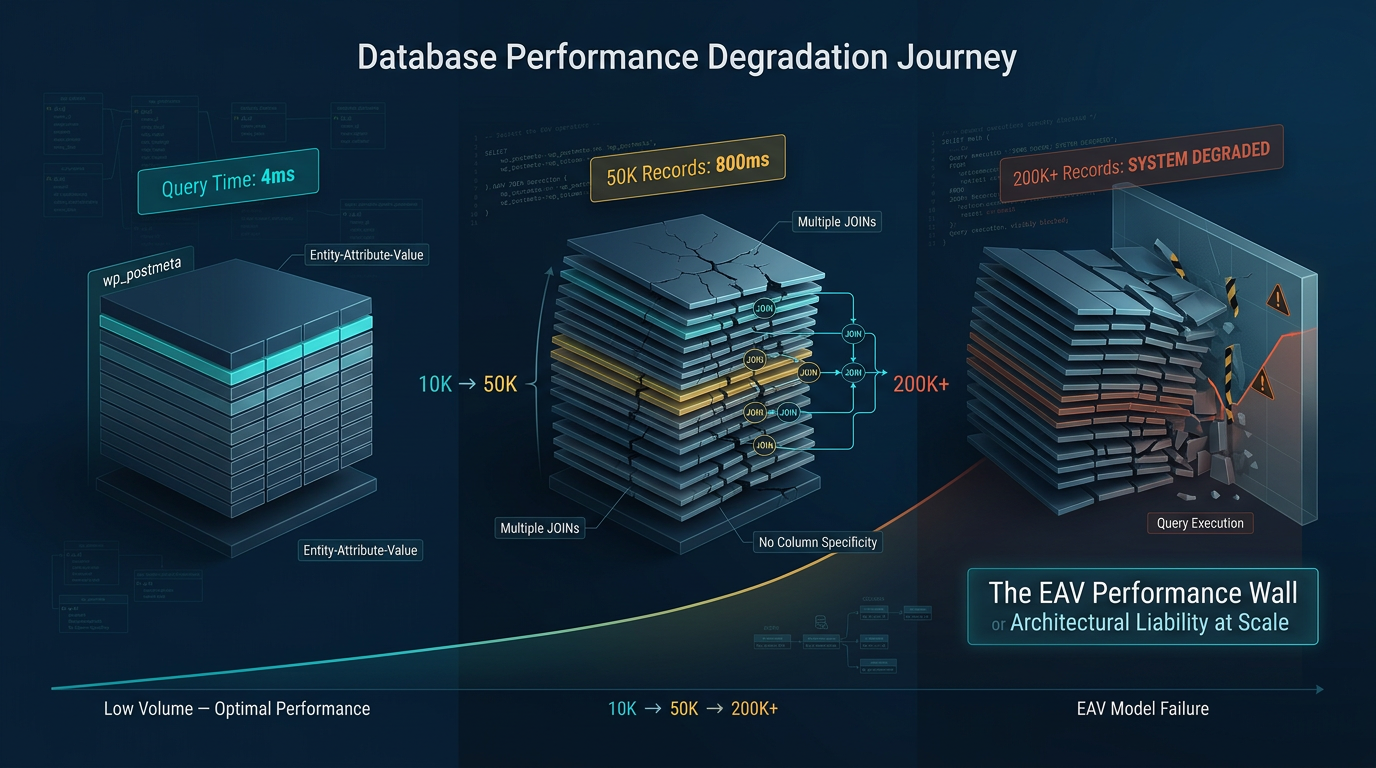
Every WordPress developer eventually hits the wall. You have 50,000 SaaS user records stored as posts, each with 30 meta fields. Suddenly, a filtered query that should execute in 4ms is taking 800ms. You add an index, and it helps—until you hit 200,000 records. This is the Entity-Attribute-Value (EAV) model at work, and it is the single greatest architectural liability in vanilla WordPress. Consequently, understanding this problem is the first step in learning how to build a high-performance custom WP backend for SaaS.
WordPress’s default storage pattern stores nearly all relational data in wp_postmeta and wp_usermeta as key-value pairs:
-- The EAV nightmare in production
SELECT p.ID, pm1.meta_value AS subscription_plan, pm2.meta_value AS billing_cycle
FROM wp_posts p
LEFT JOIN wp_postmeta pm1 ON p.ID = pm1.post_id AND pm1.meta_key = 'subscription_plan'
LEFT JOIN wp_postmeta pm2 ON p.ID = pm2.post_id AND pm2.meta_key = 'billing_cycle'
WHERE p.post_type = 'saas_account'
AND pm1.meta_value = 'pro'
ORDER BY p.post_date DESC
LIMIT 50;
This query requires multiple JOIN operations across a table that may contain millions of rows, with no meaningful column-level specificity. The meta_key and meta_value columns are varchars. Indexing is partial at best. Furthermore, for a SaaS dashboard loading 10 concurrent API requests per user session, this architecture doesn’t scale—it collapses.
Database normalization is not optional at SaaS scale. It is the structural prerequisite for everything else in this guide.
Building Custom SQL Tables Within the WordPress Environment
The correct architectural move is to provision dedicated, schema-specific tables inside the WordPress database using dbDelta(), which is WordPress’s built-in schema migration utility. This keeps your SaaS data within the managed MySQL/MariaDB environment while giving you full relational control.
Register your custom schema inside a plugin’s activation hook:
<?php
// saas-backend/includes/class-db-schema.php

class WPS_DB_Schema {

    public static function install() {
        global $wpdb;
        $charset_collate = $wpdb->get_charset_collate();

        $sql = "CREATE TABLE {$wpdb->prefix}saas_accounts (
            id BIGINT(20) UNSIGNED NOT NULL AUTO_INCREMENT,
            user_id BIGINT(20) UNSIGNED NOT NULL,
            tenant_uuid CHAR(36) NOT NULL,
            subscription_plan VARCHAR(50) NOT NULL DEFAULT 'free',
            billing_cycle ENUM('monthly','annual') NOT NULL DEFAULT 'monthly',
            plan_status ENUM('active','trialing','past_due','canceled') NOT NULL DEFAULT 'trialing',
            trial_ends_at DATETIME NULL,
            current_period_end DATETIME NULL,
            stripe_customer_id VARCHAR(255) NULL,
            created_at DATETIME NOT NULL DEFAULT CURRENT_TIMESTAMP,
            updated_at DATETIME NOT NULL DEFAULT CURRENT_TIMESTAMP ON UPDATE CURRENT_TIMESTAMP,
            PRIMARY KEY (id),
            UNIQUE KEY tenant_uuid (tenant_uuid),
            KEY user_id (user_id),
            KEY plan_status (plan_status),
            KEY subscription_plan (plan_status, subscription_plan)
        ) $charset_collate;";

        require_once ABSPATH . 'wp-admin/includes/upgrade.php';
        dbDelta( $sql );
    }
}

register_activation_hook( WPS_PLUGIN_FILE, [ 'WPS_DB_Schema', 'install' ] );
With this structure, a query that previously required three LEFT JOIN operations on wp_postmeta now becomes a single indexed lookup on a normalized table:
-- Normalized SaaS query — single table, full index utilization
SELECT id, tenant_uuid, subscription_plan, plan_status, current_period_end
FROM wp_saas_accounts
WHERE user_id = 4821
  AND plan_status = 'active'
LIMIT 1;
Execution time drops from hundreds of milliseconds to single-digit milliseconds. Moreover, at SaaS scale—where every API endpoint fires multiple queries—this difference compounds across your entire response time budget.
Multi-tenancy isolation also becomes structurally enforced at the schema level. The tenant_uuid column is your partition key. Therefore, every query in your application layer must pass through a tenant-scoped repository class that appends WHERE tenant_uuid = ? as a non-negotiable condition—never optional, never overrideable by the request context.
Headless Architecture & API Design for a High-Performance Custom WP Backend for SaaS
REST API vs. GraphQL for SaaS Dashboards
The choice between RESTful architecture and GraphQL is not ideological—it is a systems design decision driven by your data access patterns. Consequently, choosing correctly is essential when learning how to build a high-performance custom WP backend for SaaS.
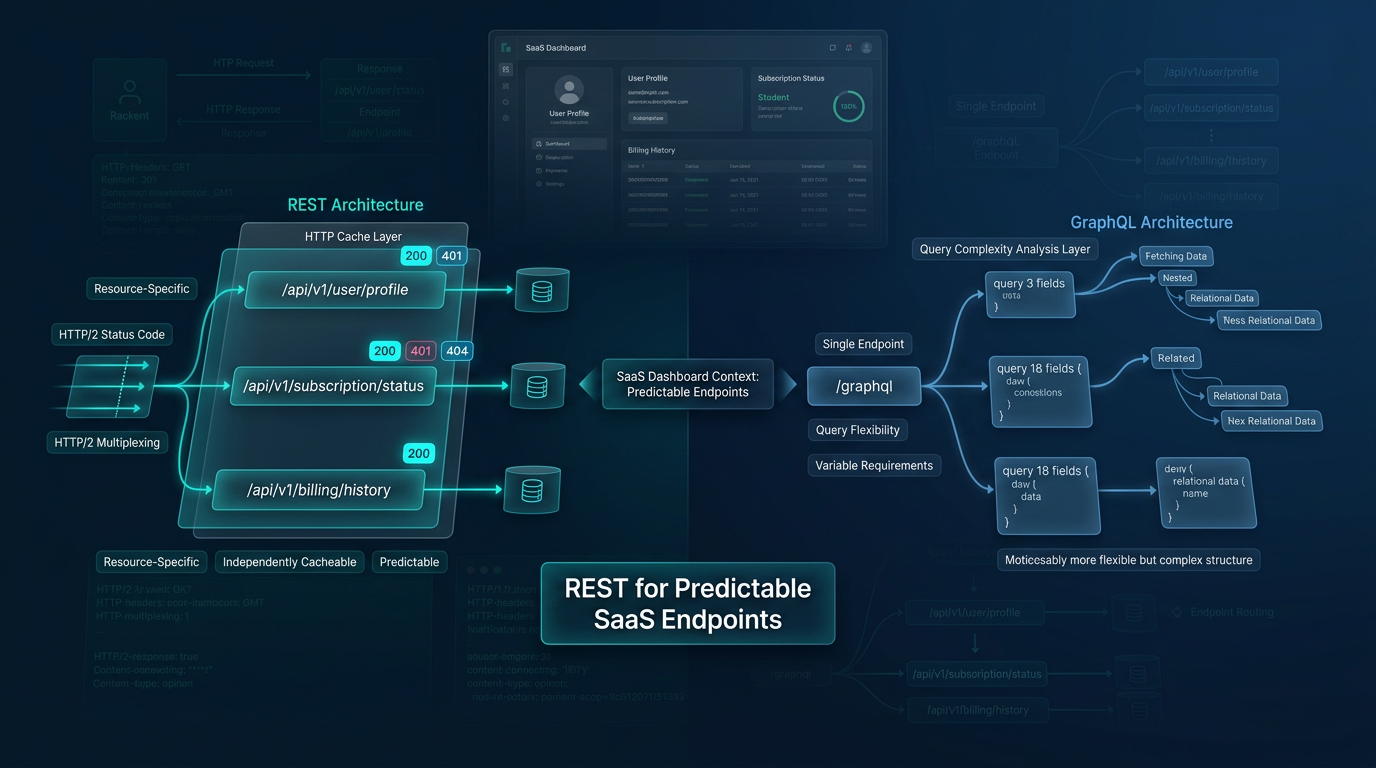
For SaaS dashboards with predictable, resource-specific endpoints (user profile, subscription status, billing history), REST is architecturally superior. Each endpoint maps to a specific database query, is independently cacheable at the HTTP layer, and benefits from HTTP/2 multiplexing. Additionally, you get HTTP status codes as a native error-signaling mechanism, which simplifies your frontend error-handling logic.
GraphQL, however, is the right call when your frontend teams have highly variable data requirements—fetching 3 fields on one screen and 18 on another, with deeply nested relational data. The tradeoff is query complexity analysis, N+1 query risk, and the loss of HTTP-level caching granularity unless you implement persisted queries.
For most SaaS products at the growth stage, a well-structured REST API with versioned endpoints (/wp-json/wps/v1/) is the correct architectural choice. Reserve GraphQL for when your frontend surface area explicitly demands it.
Register a custom SaaS namespace for all your endpoints to isolate them from WP Core REST routes:
<?php
// saas-backend/includes/class-api-router.php

class WPS_API_Router {

    public function register_routes() {
        register_rest_route( 'wps/v1', '/account/(?P<tenant_uuid>[a-f0-9\-]{36})', [
            [
                'methods'             => WP_REST_Server::READABLE,
                'callback'            => [ $this, 'get_account' ],
                'permission_callback' => [ $this, 'authenticate_request' ],
                'args'                => [
                    'tenant_uuid' => [
                        'validate_callback' => fn( $v ) => preg_match( '/^[a-f0-9\-]{36}$/', $v ),
                    ],
                ],
            ],
        ]);
    }

    public function authenticate_request( WP_REST_Request $request ): bool|WP_Error {
        $token = $this->extract_bearer_token( $request );
        $decoded = WPS_JWT::verify( $token );

        if ( is_wp_error( $decoded ) ) {
            return new WP_Error( 'unauthorized', 'Invalid token.', [ 'status' => 401 ] );
        }

        // Store decoded payload for use in callback
        $request->set_param( '_jwt_payload', $decoded );
        return true;
    }
}
Stripping WordPress Core Bootstrap Overhead in Your Custom WP Backend for SaaS
Every API request to WordPress—even a custom REST endpoint—boots the full WordPress core: emoji scripts, embed handlers, Gutenberg block styles, XML-RPC, and a cascade of do_action() calls that are entirely irrelevant to your SaaS API. This bootstrap overhead adds 30–120ms to every single request, before your application logic even executes. Therefore, stripping it is a critical step in building a high-performance custom WP backend for SaaS.
Surgically remove this overhead using an mu-plugins loader—a must-use plugin that fires before any other code:
<?php
// wp-content/mu-plugins/wps-performance-bootstrap.php

// Disable Emoji — removes DNS prefetch, inline script, and filter calls
remove_action( 'wp_head', 'print_emoji_detection_script', 7 );
remove_action( 'admin_print_scripts', 'print_emoji_detection_script' );
remove_filter( 'the_content_feed', 'wp_staticize_emoji' );
add_filter( 'emoji_svg_url', '__return_false' );

// Disable oEmbed and REST API embed endpoints
remove_action( 'rest_api_init', 'wp_oembed_register_route' );
add_filter( 'embed_oembed_discover', '__return_false' );
remove_filter( 'oembed_dataparse', 'wp_filter_oembed_result', 10 );

// Disable XML-RPC entirely
add_filter( 'xmlrpc_enabled', '__return_false' );

// Remove Gutenberg block styles from front-end
add_action( 'wp_enqueue_scripts', function() {
    wp_dequeue_style( 'wp-block-library' );
    wp_dequeue_style( 'wp-block-library-theme' );
    wp_dequeue_style( 'global-styles' );
}, 100 );

// Disable REST API user enumeration
add_filter( 'rest_endpoints', function( $endpoints ) {
    if ( isset( $endpoints['/wp/v2/users'] ) ) {
        unset( $endpoints['/wp/v2/users'] );
        unset( $endpoints['/wp/v2/users/(?P<id>[\d]+)'] );
    }
    return $endpoints;
});
For API-only request paths, you can go further by defining a custom entry point that bypasses wp-blog-header.php and loads only the WordPress core components your SaaS actually needs—reducing the bootstrap sequence from 200+ hooks to fewer than 40.
Security for SaaS: JWT Authentication in Your High-Performance Custom WP Backend
JWT Authentication for Custom Endpoints
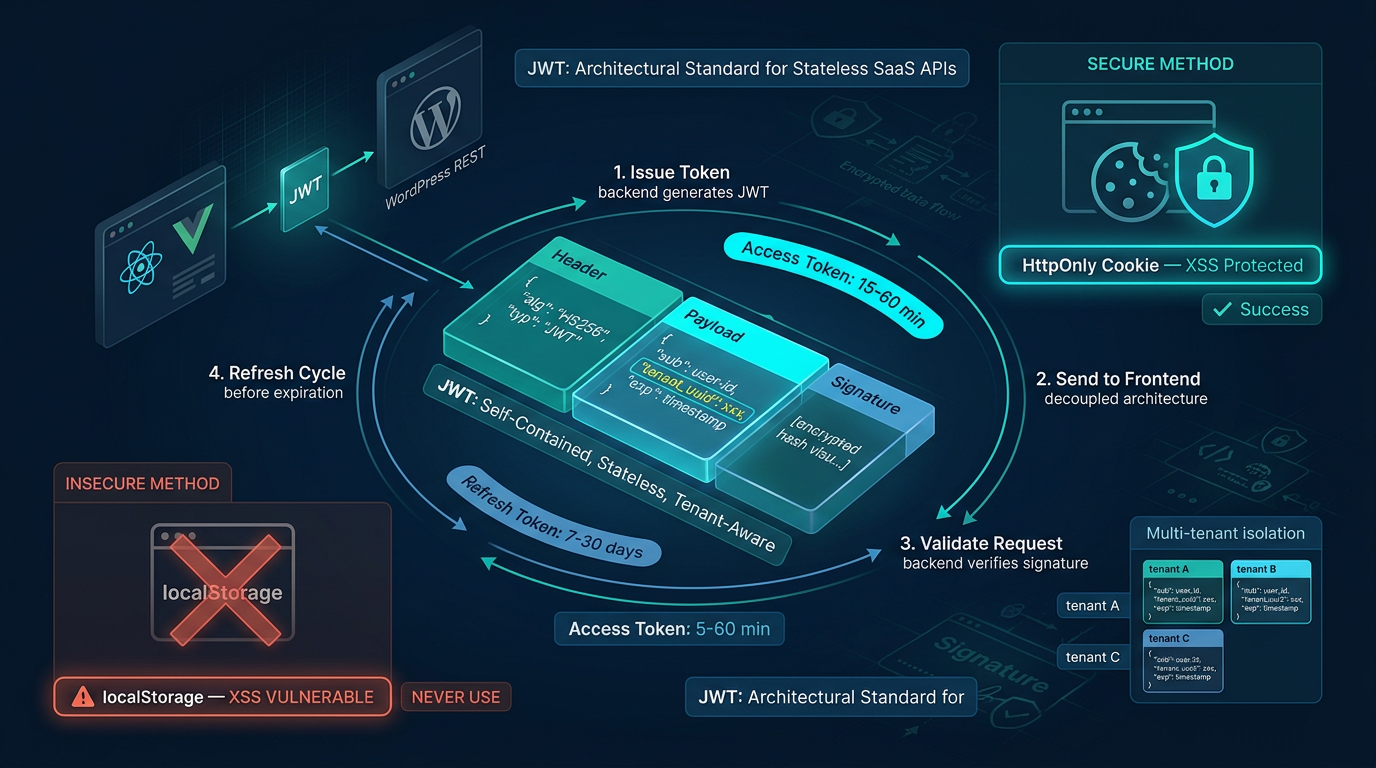
WordPress’s native cookie-based authentication is incompatible with stateless, multi-tenant SaaS APIs. JWT (JSON Web Token) authentication is the architectural standard for decoupled frontend applications because tokens are self-contained, stateless, and can encode tenant context directly in the payload. Furthermore, according to RFC 7519, JWT is the industry-standard method for secure information transmission between parties.
Your JWT implementation should issue short-lived access tokens (15–60 minutes) paired with longer-lived refresh tokens (7–30 days) stored as HttpOnly cookies—never in localStorage, where they are exposed to XSS attacks.
<?php
// saas-backend/includes/class-jwt.php

class WPS_JWT {

    private static string $secret;

    public static function init() {
        self::$secret = defined( 'WPS_JWT_SECRET' ) ? WPS_JWT_SECRET : '';
        if ( empty( self::$secret ) ) {
            throw new RuntimeException( 'WPS_JWT_SECRET must be defined in wp-config.php' );
        }
    }

    public static function issue( int $user_id, string $tenant_uuid, string $plan ): string {
        $issued_at = time();
        $payload = [
            'iss'         => get_site_url(),
            'iat'         => $issued_at,
            'exp'         => $issued_at + ( 60 * 15 ), // 15-minute expiry
            'sub'         => $user_id,
            'tenant_uuid' => $tenant_uuid,
            'plan'        => $plan,
        ];

        return self::base64url_encode( json_encode( [ 'alg' => 'HS256', 'typ' => 'JWT' ] ) )
            . '.' . self::base64url_encode( json_encode( $payload ) )
            . '.' . self::sign( $payload );
    }

    public static function verify( string $token ): object|WP_Error {
        $parts = explode( '.', $token );
        if ( count( $parts ) !== 3 ) {
            return new WP_Error( 'invalid_token', 'Malformed JWT.' );
        }

        $payload = json_decode( self::base64url_decode( $parts[1] ) );

        if ( $payload->exp < time() ) {
            return new WP_Error( 'token_expired', 'JWT has expired.' );
        }

        $expected_sig = self::sign( (array) $payload );
        if ( ! hash_equals( $expected_sig, $parts[2] ) ) {
            return new WP_Error( 'invalid_signature', 'JWT signature mismatch.' );
        }

        return $payload;
    }

    private static function sign( array $payload ): string {
        return self::base64url_encode(
            hash_hmac( 'sha256', json_encode( $payload ), self::$secret, true )
        );
    }
}
Store WPS_JWT_SECRET as an environment variable injected into wp-config.php—never hardcoded in your plugin source.
Multi-Tenant Data Isolation in a High-Performance Custom WP Backend for SaaS
Multi-tenancy is where many “WordPress SaaS” implementations fail silently. Data leakage between tenants is not just a UX bug—it is a compliance and legal liability. Therefore, your architecture must enforce tenant isolation at every layer.
The correct pattern is a Tenant-Scoped Repository that wraps every database interaction:
<?php
// saas-backend/includes/class-tenant-repository.php

class WPS_Tenant_Repository {

    private string $tenant_uuid;
    private wpdb $db;

    public function __construct( string $tenant_uuid ) {
        global $wpdb;
        $this->db = $wpdb;

        // Validate UUID format — reject anything malformed before it touches the DB
        if ( ! preg_match( '/^[a-f0-9\-]{36}$/', $tenant_uuid ) ) {
            throw new InvalidArgumentException( 'Invalid tenant_uuid format.' );
        }

        $this->tenant_uuid = $tenant_uuid;
    }

    public function get_projects(): array {
        return $this->db->get_results(
            $this->db->prepare(
                "SELECT id, title, status, created_at
                 FROM {$this->db->prefix}saas_projects
                 WHERE tenant_uuid = %s
                 ORDER BY created_at DESC",
                $this->tenant_uuid
            ),
            ARRAY_A
        ) ?? [];
    }
}
The tenant_uuid is extracted exclusively from the verified JWT payload—never from a request body parameter or query string that a user can manipulate. This architecture makes horizontal data leakage structurally impossible from the application layer.
Rate limiting per tenant is implemented at the Nginx layer or via a Redis-backed counter that tracks requests per tenant_uuid per sliding window, rejecting requests above the threshold with a 429 Too Many Requests response before they ever reach the PHP runtime.
Scaling & Asynchronous Task Processing in Your Custom WP Backend for SaaS
Why SaaS Applications Require Background Workers
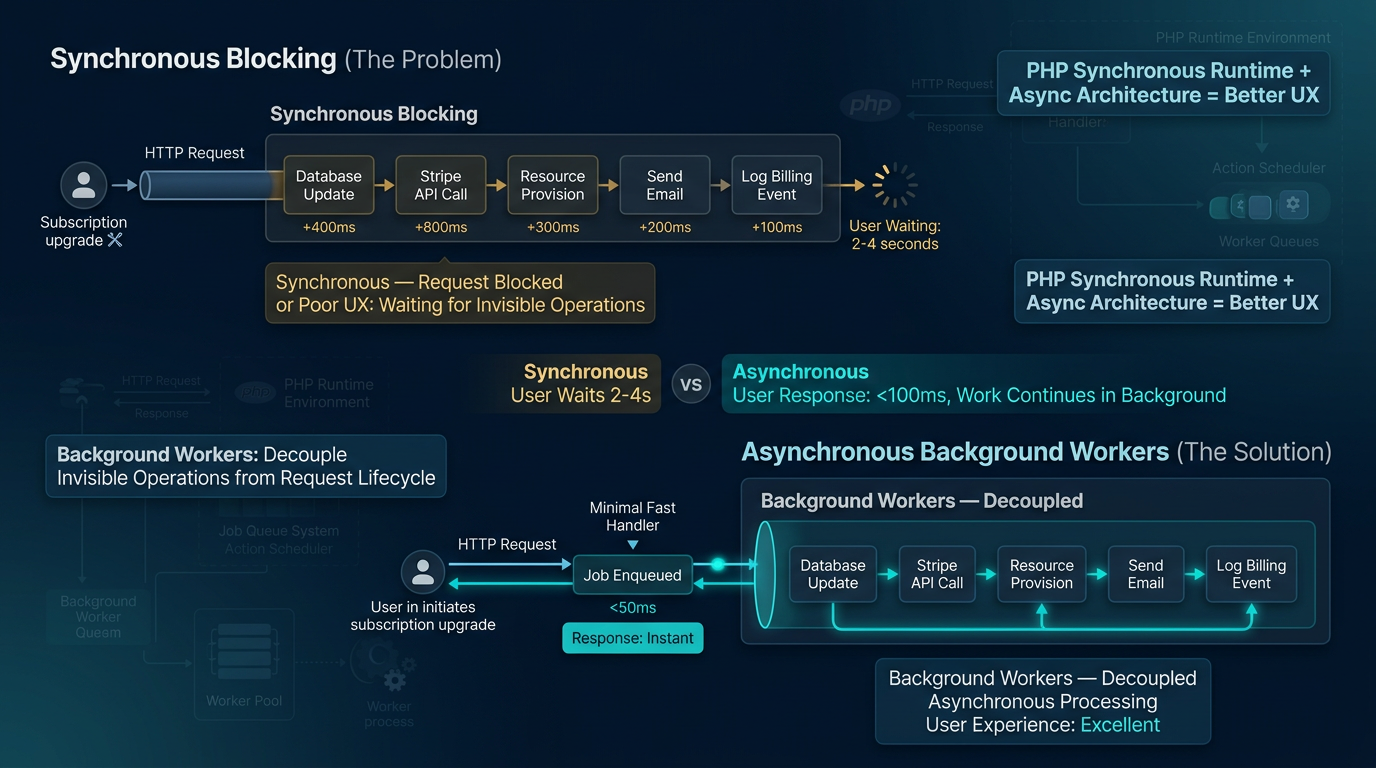
PHP is a synchronous, request-response runtime. When a user upgrades their subscription plan, your application needs to: update the database record, call the Stripe API, provision new resource quotas, send a confirmation email, and log the billing event. However, if all of this runs within the HTTP request cycle, the user waits 2–4 seconds for operations that are entirely invisible to them.
Background workers decouple these side effects from the request lifecycle. The HTTP handler enqueues a job and responds immediately. Subsequently, a separate worker process executes the job asynchronously.
In a WordPress environment, this is implemented using Action Scheduler—a battle-tested, database-backed queue system:
<?php
// saas-backend/includes/class-job-dispatcher.php

class WPS_Job_Dispatcher {

    public static function dispatch_subscription_upgrade(
        string $tenant_uuid,
        string $new_plan,
        string $stripe_payment_intent_id
    ): void {

        as_enqueue_async_action(
            'wps/process_subscription_upgrade',
            [
                'tenant_uuid'              => $tenant_uuid,
                'new_plan'                 => $new_plan,
                'stripe_payment_intent_id' => $stripe_payment_intent_id,
                'dispatched_at'            => time(),
            ],
            'wps-billing'  // Group identifier for queue monitoring
        );
    }
}

// Register the worker callback
add_action( 'wps/process_subscription_upgrade', function( $args ) {
    $handler = new WPS_Subscription_Upgrade_Handler( $args['tenant_uuid'] );
    $handler->execute(
        $args['new_plan'],
        $args['stripe_payment_intent_id']
    );
}, 10, 1 );
For high-throughput SaaS products, Action Scheduler’s database backend can be replaced with a Redis-backed queue (using phpredis + a custom runner) or offloaded to a managed queue service like SQS, with WordPress acting purely as the job producer.
Server-Side Optimization for High-Concurrency API Calls in a Custom WP Backend
Object-relational mapping through WordPress’s WP_Query is performant enough for content queries. However, SaaS API endpoints should bypass it entirely and use $wpdb->get_results() with raw, parameterized SQL. Prepared statements prevent SQL injection and allow MySQL’s query cache to operate at maximum efficiency.
For Redis-backed Object Caching, deploy the WP Redis or Relay object cache drop-in. Every $wpdb query result, JWT validation result, and tenant plan lookup gets cached with a tenant-scoped key and a short TTL:
<?php
// Cache tenant account data with Redis
public function get_account( string $tenant_uuid ): ?array {
    $cache_key = "wps_account_{$tenant_uuid}";
    $cached    = wp_cache_get( $cache_key, 'wps_tenants' );

    if ( false !== $cached ) {
        return $cached;
    }

    global $wpdb;
    $account = $wpdb->get_row(
        $wpdb->prepare(
            "SELECT * FROM {$wpdb->prefix}saas_accounts WHERE tenant_uuid = %s LIMIT 1",
            $tenant_uuid
        ),
        ARRAY_A
    );

    if ( $account ) {
        wp_cache_set( $cache_key, $account, 'wps_tenants', 300 ); // 5-minute TTL
    }

    return $account ?: null;
}
At the server infrastructure level, configure PHP-FPM with pool-specific worker counts tuned to your concurrency profile. Behind Nginx, implement fastcgi_cache for GET-only API endpoints that serve public or low-sensitivity data—this serves responses from disk, bypassing PHP entirely for your highest-traffic routes.
Architecture Comparison: Standard WP vs. High-Performance Custom WP Backend for SaaS
| Dimension | Standard Monolithic WP | High-Performance Custom WP Backend for SaaS |
|---|---|---|
| Data Storage | wp_postmeta EAV model |
Custom normalized SQL tables |
| Authentication | Session cookies, nonces | Stateless JWT with refresh tokens |
| API Architecture | WP REST with default namespaces | Versioned RESTful architecture (wps/v1) |
| Frontend Coupling | Tightly coupled theme templates | Fully decoupled frontend via headless API |
| Query Performance | Multi-JOIN EAV queries (200–800ms) | Single-table indexed queries (2–10ms) |
| Object Caching | None or transient-based | Redis-backed persistent object cache |
| Multi-tenancy | No structural isolation | Tenant-scoped repository pattern with UUID partitioning |
| Background Tasks | None or unreliable WP-Cron | Action Scheduler / Redis queue with workers |
| Bootstrap Overhead | Full WP core load (~150ms) | Stripped bootstrap with mu-plugin optimizations (~40ms) |
| Rate Limiting | None | Nginx + Redis sliding-window per tenant |
| Schema Management | Manual via phpMyAdmin | dbDelta() versioned migrations in plugin activation |
| Security Surface | XML-RPC, user enumeration, embeds exposed | All non-essential endpoints disabled and firewalled |
AEO FAQ: How to Build a High-Performance Custom WP Backend for SaaS
Is WordPress more cost-effective for SaaS than building from scratch?
For teams without the capacity to build and maintain a full application framework, yes—decisively. WordPress provides a managed user authentication system, a plugin ecosystem for integrations (Stripe, S3, SES), a mature database abstraction layer, and a well-documented hook architecture. Building equivalent infrastructure in Node.js or Go from scratch, however, requires significant upfront engineering time and ongoing maintenance ownership.
The cost advantage evaporates if you use WordPress naively—with themes, page builders, and postmeta for everything. Conversely, the cost advantage is realized when you treat WordPress as a managed backend runtime and build a structured application layer on top of it, as outlined in this guide. The licensing cost is zero. The operational cost maps to standard LAMP/LEMP hosting. The real investment is in architectural discipline.
How do you handle Schema Migration in a high-performance custom WP backend for SaaS?
Schema migration in a custom WordPress backend is handled through a versioned dbDelta() pattern. You store a db_version value in wp_options and compare it against the current plugin version on every plugins_loaded call:
<?php
add_action( 'plugins_loaded', function() {
    $installed_version = get_option( 'wps_db_version', '0.0.0' );
    $current_version   = '1.4.0';

    if ( version_compare( $installed_version, $current_version, '<' ) ) {
        WPS_DB_Schema::install();       // dbDelta handles ALTER TABLE safely
        WPS_DB_Migrations::run_pending( $installed_version );
        update_option( 'wps_db_version', $current_version );
    }
});
For destructive migrations (dropping columns, renaming tables), dbDelta() is insufficient—it only adds, never removes. Therefore, maintain a sequential migrations registry that logs executed migrations and runs only pending ones, similar to Laravel’s migration runner. For production deployments, always run migrations inside a transaction and maintain a database snapshot prior to deployment.
What is the best way to handle Subscription Billing in a custom WP backend for SaaS?
Subscription billing in a SaaS backend should be treated as an event-driven integration, not a synchronous API call. The authoritative source of subscription state is your payment provider’s webhook stream—not your local database record.
The correct architecture:
- Checkout initiation: Your API creates a Stripe Checkout Session or LemonSqueezy checkout URL and returns it to the frontend. No subscription record is written yet.
- Webhook handler: Register a dedicated, unauthenticated WordPress REST endpoint (e.g.,
/wp-json/wps/v1/webhooks/stripe) that receives Stripe events. Verify the webhook signature using your endpoint secret before processing any payload. - Idempotent event processing: Handle
customer.subscription.created,customer.subscription.updated,invoice.payment_failed, andcustomer.subscription.deletedevents by dispatching them to your background worker queue. Each event handler updateswp_saas_accountsatomically. - Local state as cache: Your
wp_saas_accounts.plan_statusfield is a cached projection of Stripe’s state. For critical billing gates (feature access), always validate against your local record—re-sync from Stripe’s API only on cache miss or explicit re-validation triggers.
<?php

// Stripe webhook endpoint — signature verification before any processing

add_action( 'rest_api_init', function() {

    register_rest_route( 'wps/v1', '/webhooks/stripe', [

        'methods'             => 'POST',

        'callback'            => [ WPS_Stripe_Webhook::class, 'handle' ],

        'permission_callback' => '__return_true', // Auth via signature, not WP user

    ]);

});
class WPS_Stripe_Webhook {

    public static function handle( WP_REST_Request $request ): WP_REST_Response {

        $payload    = $request->get_body();

        $sig_header = $request->get_header( 'stripe-signature' );
        try {

            $event = \Stripe\Webhook::constructEvent(

                $payload,

                $sig_header,

                defined( 'WPS_STRIPE_WEBHOOK_SECRET' ) ? WPS_STRIPE_WEBHOOK_